Accessing Shared Accounts on Mobile (iOS)
1. Go to Settings, Select Passwords & Accounts.

2. The following screen will appear, select Add Account.
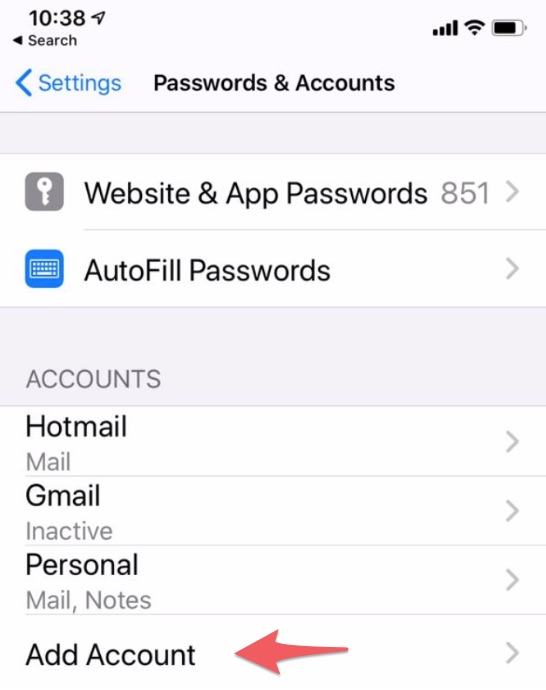
3. Selecting Add Account will bring users to the following page. Click Other.
4. Select Add Mail Account.
5. This is where users will begin to create a new profile. Type in Name, Email Address, Password, & a Description of the shared email.
Select Next.

Note: Trying to access the shared account this way will most likely fail as iPhones only understand the process of logging into individual accounts and therefore users will have to provide additional info (See steps 5 & 6).
5. Once the Shared Account is logged into there should an option to select POP or IMAP. Make sure IMAP is selected.
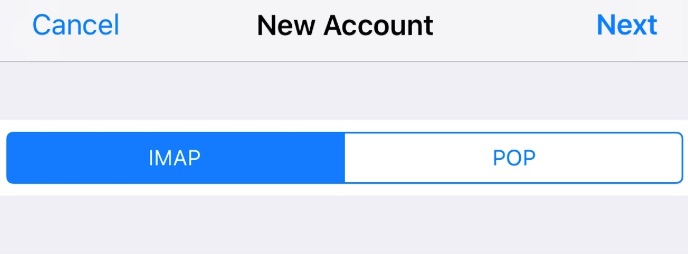
6. Continue by filling out the following information.
7. Click Next.
Related Articles
How to Open a Shared Mailbox on the Web Version of Outlook
These are the instructions on how to Open a Shared Mailbox on the Web Version of Outlook Go to outlook.office.com Sign into a personal/work account. Click the My Accounts button in the upper right-hand corner. A side menu will appear. Click Open ...How to Delete User Accounts
Step 1: Click on the User Accounts link in the Dashboard. Step 2: Find User Account to be deleted. Click the Edit link on the right-hand side. Step 3: Scroll to the bottom of the page and press the Cancel Account button. Step 4: You will be brought ...How to Edit Existing User Accounts
Step 1: Follow steps 1 & 2 of How to Add New Users Step 2: Find User Account to be edited. Click the Edit link under the Operation column. Step 3: Update desired information. Press Save Button. Step 4: If the user account is to be cancelled press ...Microsoft Office 365 Email Setup
Here are the instructions on how to access your email: Please note: For best results with Office 365, Aptitude recommends using the applications that are native to it. In the case of email, the Microsoft Outlook email client is recommended for all ...Troubleshooting GSuite Account Login
Problem User is unable to log into their GSuite account. This can be caused by a couple of different issues: The user is logged into another Google Account on the same web browser. The user does not know the password for their account. Solution - ...